


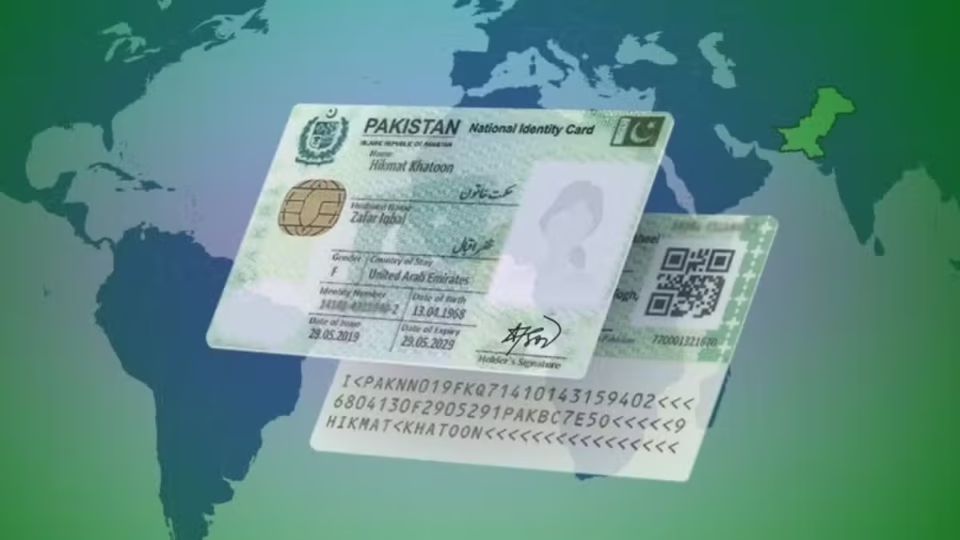
How Overseas Pakistanis Can Apply for a NICOP in 2026
Overseas Pakistanis can apply for a National Identity Card for Overseas Pakistanis (NICOP) without visiting Pakistan. The application can be completed online through NADRA’s official PakID mobile app or by visiting a designated NADRA Registration Center.
NICOP is issued to eligible Pakistani citizens living abroad and serves as proof of Pakistani nationality. It also allows eligible cardholders to travel to Pakistan without obtaining a visa.
NADRA accepts applications for new NICOPs, renewals, modifications, and replacement cards through the PakID platform.
What Is a NICOP?
A National Identity Card for Overseas Pakistanis (NICOP) is an identity document issued by NADRA to Pakistani citizens who live, work, or study outside Pakistan.
The card contains the holder’s personal and family information and is accepted as official proof of Pakistani nationality. NADRA currently issues the Smart NICOP, which includes enhanced security features such as QR-based verification and improved protection against identity fraud.
Who Can Apply?
The following individuals are generally eligible to apply for a NICOP:
- Pakistani citizens living or working abroad
- Pakistani students studying overseas
- Pakistani citizens holding recognized dual nationality
- Pakistanis planning to stay abroad for an extended period
- Children born abroad to Pakistani parents
- Individuals eligible for registration as Pakistani citizens under applicable laws
Children of eligible Pakistani citizens and recognized dual nationals may also apply for a Smart NICOP.
NICOP Application Categories
Applicants should select the appropriate category before submitting an application:
New NICOP
For first-time applicants.
Renewal
For expired or soon-to-expire NICOPs.
Modification
For updating details such as:
- Name
- Marital status
- Address
- Date of birth
- Parent or spouse information
- Other printable details
Supporting documents may be required depending on the requested changes.
Lost or Stolen Card
Applicants whose NICOP has been lost or stolen can request a replacement through the reprint category.
Documents Required
The required documents may vary depending on the applicant’s age, country of residence, and application type. Commonly requested documents include:
- CNIC or NICOP details of parents
- CNIC or NICOP details of a close blood relative
- Pakistani or foreign passport
- Residence, work, or study permit
- Computerized birth certificate
- Detailed birth certificate for children born abroad
- Citizenship or naturalization certificate (where applicable)
- Marriage certificate (for marital status updates)
- Biometric verification by a parent or blood relative
- Previous NICOP (for renewals or modifications)
- Supporting documents for requested corrections
Applicants should review the document checklist displayed in the PakID app, as additional documents may be required depending on individual circumstances.
How to Apply Online Through PakID
Step 1: Download the PakID App
Install the official NADRA PakID application from the Google Play Store or Apple App Store.
Step 2: Create an Account
Register using your:
- Email address
- Mobile number
- Password
- Required identity details
Existing users can simply log in.
Step 3: Select the Required Service
Choose:
- Fresh NICOP
- Renewal
- Modification
- Reprint/Lost Card
Step 4: Enter Personal Information
Provide accurate details, including:
- Full name
- Date and place of birth
- Current and permanent address
- Parent and spouse information (if applicable)
- Contact details
- Passport and nationality information
Ensure all information matches your supporting documents.
Step 5: Upload Your Photograph
Submit a recent passport-style photograph that meets NADRA’s image requirements.
Step 6: Complete Biometric Verification
Follow the instructions to complete fingerprint verification.
Some applicants may be asked to obtain biometric verification from a parent or close blood relative or visit a NADRA Registration Center if online verification is unsuccessful.
Step 7: Upload Supporting Documents
Upload clear, readable copies of all required documents.
Make sure:
- All corners of each document are visible.
- Text is clear and legible.
- Documents are valid where applicable.
Step 8: Complete Verification
Depending on the application, witness verification or attestation may be required. The PakID app will provide instructions if additional verification is needed.
Step 9: Pay the Fee
Pay the applicable fee using one of the payment options available in the PakID app.
The amount depends on:
- Country of residence
- Application type
- Processing category
Step 10: Review and Submit
Carefully review your application before submission.
Incorrect information may delay processing. After submission, save your tracking number for future reference.
Applying Through a NADRA Registration Center
Applicants choosing to visit a NADRA Registration Center generally complete the following steps:
- Receive a queue token.
- Photograph and fingerprint capture.
- Verification of personal information.
- Required attestation (if applicable).
- Application review.
- Fee payment.
- Card printing and delivery or collection.
NICOP Fees and Processing Time
Zone A (United States and Europe)
| Processing Type | Fee | Processing Time |
|---|---|---|
| Normal | $39 | 31 Days |
| Urgent | $57 | 23 Days |
| Executive | $75 | 9 Days |
Zone B (Middle East and Africa)
| Processing Type | Fee | Processing Time |
| Normal | $20 | 31 Days |
| Urgent | $30 | 23 Days |
| Executive | $40 | 9 Days |
Processing times begin after a complete application has been successfully submitted. Missing documents or verification issues may result in delays.
How to Track Your Application
Applicants can track their application through the PakID app.
Common status updates include:
- Application Submitted
- Payment Received
- Under Review
- Deferred
- Approved
- Card Printing
- Card Dispatched
Applicants should also monitor their registered email and mobile notifications.
What Does “Deferred” Mean?
A deferred application is not a rejection.
It usually means NADRA requires additional information, clearer documents, or further verification before processing can continue. Applicants should follow the instructions provided in the PakID app and submit the requested information within the specified timeframe.
Frequently Asked Questions
Can I apply for NICOP online from abroad?
Yes. Fresh, renewal, modification, and replacement applications can be submitted through the PakID mobile app.
Can a child born abroad apply for NICOP?
Yes. Eligible children born outside Pakistan to Pakistani parents can apply by providing the required documents.
Can I renew my NICOP before it expires?
Yes. Renewal applications can be submitted before the card expires.
What if my NICOP is lost abroad?
Use the Reprint/Lost Card option in PakID and follow the application instructions.
Does a NICOP holder need a Pakistani visa?
Eligible NICOP holders can generally enter Pakistan without obtaining a visa.
Will I always need to visit a NADRA center?
No. Many applications can be completed online. However, NADRA may require an in-person visit if additional verification or biometric authentication is necessary.
